12 Tips for Setting Up an Ergonomic Workstation at Home

Sian Victoria © - Sitting at desk with a beach view
Guide to a Healthier, Comfortable and Supportive Home Office
The lines between our work and personal lives are more intertwined than ever, making it really important to carve out a dedicated space for work. Having a well-designed ergonomic workstation can do wonders for your productivity. It can also help prevent discomfort or injuries due to prolonged sitting or maintaining improper posture, which I have struggled with for many years due to back and neck pain.
Whether you’re working a full-time gig, freelancing, or hitting the books from home, it’s ideal to set up an environment that sparks focus and creativity and makes you feel good, so that you're not dreading being at a desk for the day. With just a few worthwhile steps, you can change your home workspace into a comfy and efficient area, making your workdays a lot more enjoyable.
What Happens if a Workplace is Not Designed Ergonomically?
As I know all too well, a poorly designed workplace can lead to a few uncomfortable and sometimes serious issues.
Musculoskeletal disorders are a common problem. Many people deal with aches and pains in their backs, necks, and shoulders because of bad setups. If your wrists aren’t positioned right, you might end up with carpal tunnel syndrome. Plus, sitting and working in the wrong chair or at the wrong desk height can cause chronic pain that creeps down to your hips and knees.
Circulatory issues can also pop up. Sitting in a bad posture often means blood isn’t flowing well, especially in your legs. Long periods of sitting, without any proper support, can result in blood accumulation, which may result in varicose veins. If you’re not moving around much, you can also potentially get deep vein thrombosis (DVT), so it’s best to stretch your legs every now and then.
There are methods to eliminate varicose veins at home; however, if they affect your confidence and are severe, they may require varicose vein treatment at a vein centre. So, it's best to make adjustments to your desk and lifestyle to avoid this from happening.
Headaches and eye strain are other common complaints. If your monitor isn’t in the right spot, it can lead to neck strain and tension headaches. And let’s not forget about lighting—bad lighting can result in digital eye strain, which brings discomfort, blurry vision, and trouble focusing on tasks.
Cognitive effects are also a factor. A messy workspace can ramp up stress and anxiety, making it harder to concentrate. If you’re uncomfortable, you might find yourself feeling mentally exhausted, which can hurt your productivity and creativity. All those distractions can make it tough to meet deadlines or finish up projects.
Long-term health effects are definitely something to keep in mind. Ignoring ergonomic issues can lead to serious health problems, potentially resulting in financial and physical costs, or even result in you having to visit a vein clinic, especially if you're dealing with pain that could have been prevented with better habits. It's always a good idea to pay attention to how you're sitting or working to steer clear of those kinds of problems down the line. If things get serious, it could even impact your career choices or lead to early retirement. Dealing with ongoing pain can also bring down job satisfaction and increase absenteeism.
Overall, if your space isn’t comfortable and organised, it can drain your morale. Over time, these ongoing issues can lead to burnout, affecting both your work life and your personal life.
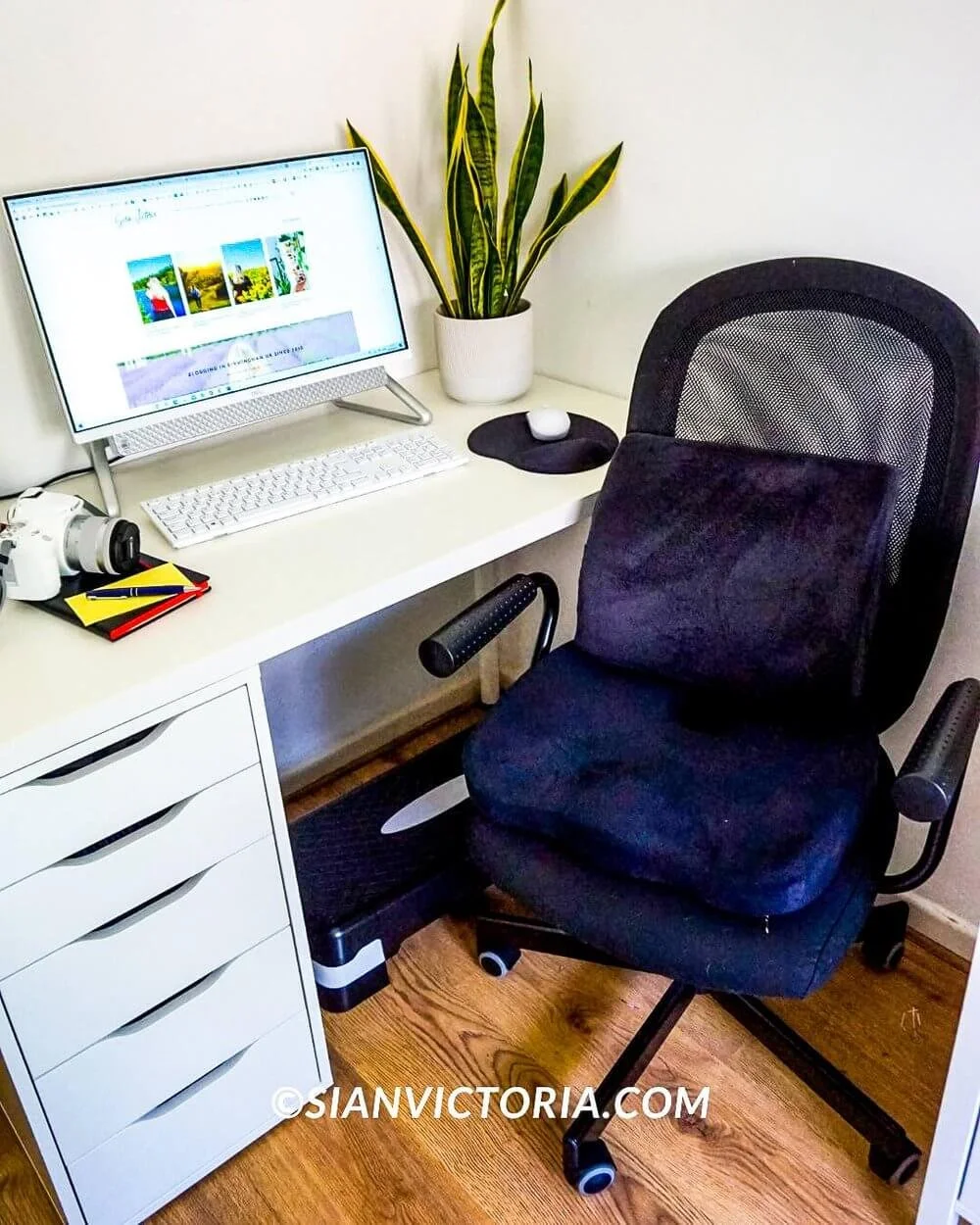
Sian Victoria © - Desk with ergonomic chair, mouse pad and footrest
1. Finding the Perfect Ergonomic Chair
A well-designed ergonomic chair really makes a difference when it comes to comfort and minimising back pain during long hours of work. When choosing one, it’s helpful to find features like adjustable height, which lets you keep your feet flat on the ground or on a footrest. Good lumbar support helps maintain the spine's natural curve, which can prevent that annoying lower back pain.
Also, the seat should be deep enough to support your thighs comfortably without cutting into the back of your knees. Adjustable armrests are a big plus, too, as they ensure your shoulders stay relaxed and aligned with your desk. If you can find a chair that reclines, that’s a great bonus—it gives you the option to change your position when you need a break. Finally, consider a chair made from breathable fabric to help keep you cool and comfortable as you work throughout the day.
2. Footrest Benefits
A footrest can really add to your home office setup, especially for those long hours spent sitting. It helps improve circulation by elevating the feet, which may lower the chance of blood clots and varicose veins. Proper foot positioning can ease the strain on your lower back, making your work sessions more comfortable overall.
Many footrests also promote better posture by encouraging you to sit back in your chair, ensuring your spine gets the support it needs. They can be particularly helpful for shorter individuals like me who struggle to keep their feet flat on the ground, and can benefit from a footrest.
When having a stable surface for your feet, a footrest can greatly reduce leg fatigue during the day. Additionally, many models come with adjustable angles, allowing you to customise the position to suit your comfort needs perfectly.
3. Desk Height and Positioning
Your desk should be set up so that your elbows should be able to rest comfortably at an angle of 90 degrees as you type. This adjustment helps reduce any strain on your shoulders and wrists. It’s important for the height of your desk to match your elbow level, which allows for a more relaxed arm position. Make sure your feet are flat on the floor or on a footrest, as this supports good posture and keeps your legs comfortable.
Additionally, keeping your work materials within easy reach is a smart move. This prevents you from stretching or twisting too much, which can lead to discomfort. Paying attention to your desk height and positioning can greatly improve your workstation setup, making it more comfortable and efficient for your work.
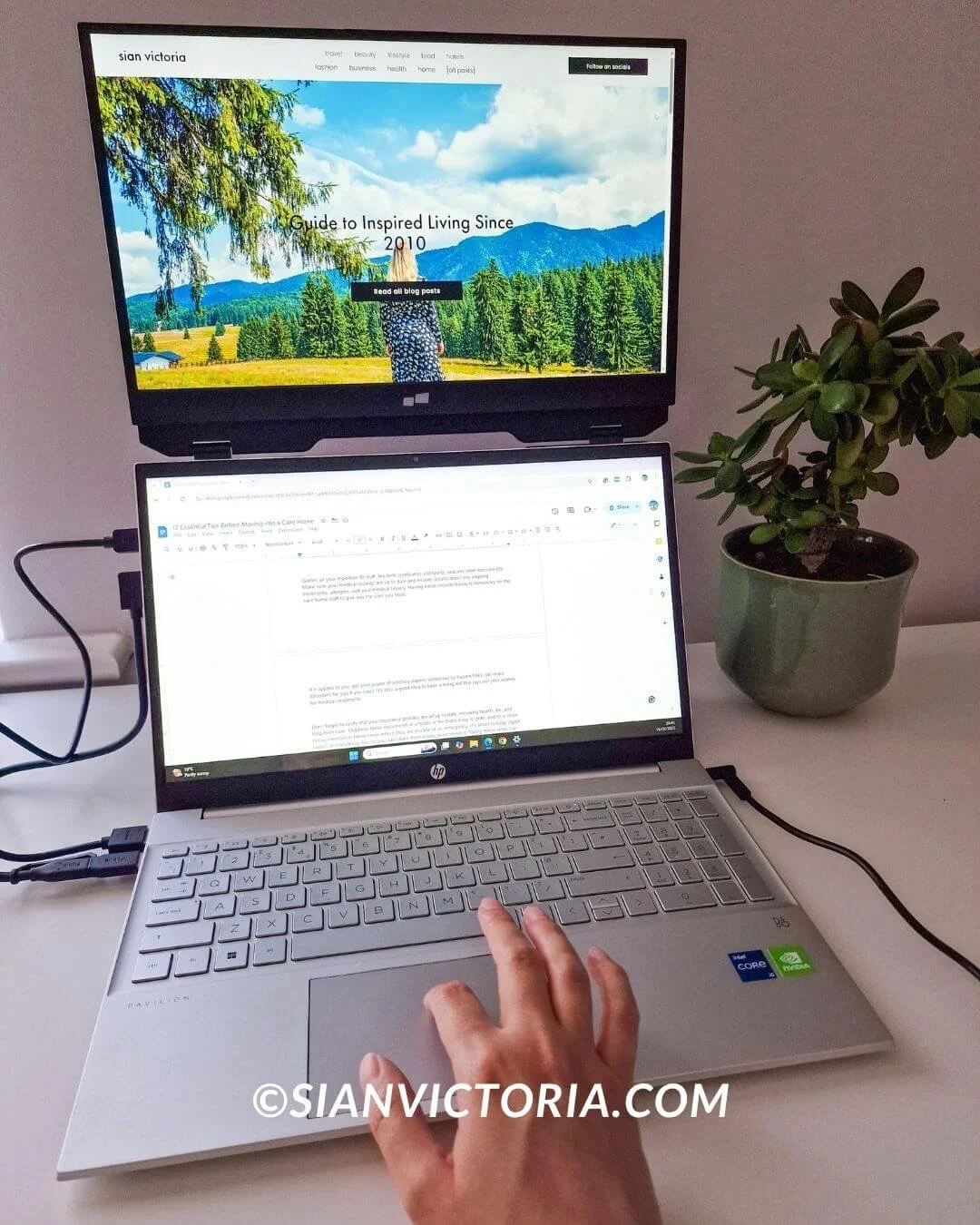
Sian Victoria © - Laptop with a Duex Float second screen
4. Monitor Placement
For the best setup with your monitor, position the top of your screen right at or just below your eye level. This helps keep your neck in a relaxed position. Ideally, you want your monitor to be about an arm's length away. This distance lets you see the whole screen comfortably without leaning forward or straining your eyes.
Adjust the tilt of your monitor so it faces directly toward you. This way, you won’t have to tilt your head, reducing discomfort. If you're using multiple monitors, try placing them side by side. Keep your main screen right in front of you and angle the secondary screen slightly. This arrangement minimises neck strain and helps you work more efficiently.
Make sure the height of your monitor works well with your desk. Using a monitor stand or an adjustable arm can help you find that sweet spot, making it easier to maintain good posture. Also, pay attention to glare from windows or lights above, as it can make your eyes feel tired. An anti-glare screen filter can really help with this.
If you use bifocal or progressive lenses, you might want to lower your monitor a bit to find a comfortable viewing angle that doesn't require straining your neck.
Alternatively, if you’re tired of straining your neck and back while working on the go and want an extra screen for your laptop, consider the Duex Float. This 15.6-inch 1080p portable touchscreen laptop monitor allows you to create a stacked dual-screen configuration easily, no matter where you are. It’s perfect for anyone who needs to juggle multiple tasks without cluttering their desk with extra screens.
5. Keyboard and Mouse Positioning
The way you set up your keyboard and mouse can really help reduce strain on your hands and wrists. Position your keyboard so your forearms stay parallel to the floor with your wrists relaxed. Maintaining your elbows in a bent position at approximately a 90-degree angle helps keep tension at bay.
If you're looking for added comfort, consider trying out an ergonomic keyboard; it can provide better support and lower the chances of repetitive strain injuries. When you type, let your wrists hover just above the keyboard instead of resting on it for a more natural hand position.
For your mouse, make sure it’s easy to reach to avoid stretching your arm too much. An ergonomic mouse can give your hand good support and minimise wrist movements. Keep the mouse at the same height as your keyboard, and use your whole arm to move it instead of just your wrist. This approach can help prevent issues like carpal tunnel syndrome.
If you have the option, using a wrist rest can add some extra support, especially during long periods of work. Adjusting your mouse sensitivity can also make it easier to control, which further reduces strain. Simple tweaks to your setup can greatly improve your comfort and decrease the risk of ongoing problems.

Sian Victoria © - Standing ‘standidesk’ with plants
6. Lighting Considerations
Good lighting really makes a difference in how productive and comfortable your home office can be. Getting more natural light into your space is a fantastic option, so placing your desk near a window is a smart move. Just keep in mind that direct sunlight can cause glare on your screen, so having some blinds or curtains on hand to soften that light is a great idea.
A solid desk lamp is also a must-have. Look for one that lets you adjust the brightness and colour temperature, which can help reduce eye strain throughout the day. Task lighting can really help light up your work area properly. Adjustable lamps are perfect for directing light exactly where you need it, whether you’re reading documents or focusing on detailed tasks.
Adding some ambient lighting can provide overall brightness and balance the light in the room, which helps lessen the contrast between your screen and the rest of the space. Avoid lighting that’s too harsh or too dim since either extreme can lead to eye strain and headaches. LED bulbs are a wise option as they provide bright, uniform illumination and help reduce energy expenses.
If your workspace is on the larger side, adding floor lamps or wall-mounted lights can help distribute light evenly and keep everything well-lit.
7. Organisation and Decluttering
Having a tidy and organised workspace really helps you stay focused and get things done. Start off by checking what's on your desk and getting rid of anything you don’t use regularly. It's a good idea to use shelves, drawers, and organisers to keep the essentials handy but out of the way. Labelled containers are great for sorting supplies, so you won’t waste time searching for them.
Managing your cables is also handy; tangled cords can be problematic. Consider using Velcro ties, cable clips, or under-desk trays to keep everything neat and out of sight.
A minimalist approach can work wonders. Keep only the items you use daily on your desk, and find designated spots for everything else. Regularly taking a moment to declutter will help you avoid accumulating unnecessary stuff.
Digital tools can also be a lifesaver for cutting down on paper clutter. Digitally scanning essential documents and saving them in digital-format folders makes everything easier to find without the hassle of physical files piling up.
Don’t overlook your wall space! Wall-mounted shelves or pegboards can be super helpful for storing things like headphones and pens, freeing up some of that precious desk space.
Ultimately, a clean and organised workspace not only looks nice but can also help you feel more focused and efficient while you work.
8. Adding Beneficial Plants
Plants can really improve your home office vibe. They help clean the air by filtering out toxins and releasing oxygen, leading to a fresher atmosphere. Plus, having greenery around can boost your mood and lower stress, which is always a win when you’re trying to be productive.
When you’re picking out indoor plants for your workspace, go for those that are easy to care for. Succulents, spider plants, and pothos make excellent options since they thrive in indoor light and don’t need a lot of attention. They can handle different lighting conditions and don’t mind if you skip watering them once in a while, which is perfect for a busy schedule.
To really enjoy their benefits, place the plants where you can see them easily. Small plants can sit on your desk, while larger ones can fill up corners or get a spot on your shelves. Mixing various types of plants can add some nice visual interest and make your workspace feel more inviting.
Consider getting self-watering planters or pots with good drainage to make plant care even easier. This way, you can keep your greenery healthy without constantly checking on it. Bringing plants into your home office can definitely make your workdays feel a bit more enjoyable and productive. Until you add them to your environment, you’ll never realise how beneficial they are.

Sian Victoria © - Sitting at an organised and inspiring desk
9. Temperature and Ventilation
Finding the right temperature and ventilation in your home office makes a big difference in staying comfortable and focused. Aim for a cosy temperature between 20-22°C (68-72°F), which is generally recognised as great for getting work done. You'll want to adjust your heating or cooling systems to keep it steady throughout the day, since any big changes can impact your concentration.
Good airflow is equally important. Proper ventilation can really improve the air quality in your workspace. Stale air can lead to feeling tired and less alert, so bringing in some fresh air is a smart move. If you have windows, try opening them up from time to time to let in a breeze. If that’s not an option, using fans or air purifiers can help keep the air circulating and filter out any unwanted particles.
Think about where your workspace is located in relation to your heating and cooling vents. Make sure those vents aren't blocked by furniture or other items to ensure air can flow freely. Small changes, like using a desk fan during the summer or a heater for the winter, can really help keep your workspace comfortable and fresh.
10. Noise Management
Managing noise is ideal for staying focused and productive in your home office. One great option is to use noise-cancelling headphones, which can help shut out background sounds and make your workspace feel calmer. Another idea is to play some white noise or ambient sounds, which can mask distractions and aid concentration.
Soft furnishings like rugs, curtains, and upholstered chairs can help absorb sound and reduce echo, adding to a quieter atmosphere. Adding bookshelves or other large pieces of furniture can also contribute to reducing noise by breaking up sound waves.
It’s also worth considering the location of your home office to reduce noise distractions. If you have the option, picking a room away from busy areas in your home can be beneficial. Using weather stripping or door sweeps can seal any gaps around doors, further cutting down on noise coming from other parts of the house.
For those seeking a quieter environment, investing in soundproofing materials like acoustic panels might be a smart choice. These can be mounted on your walls to help block out unwanted noise.
Putting these strategies into action can add to your enjoyment of a more peaceful workspace, leading to improved productivity and overall mental and physical well-being.
11. Personalising Your Space
Adding personal touches to your workspace can really lift your mood and make your office feel warmer. Think about choosing items that showcase your personality and spark your creativity, like framed photos, artwork, or a favourite quote that resonates with you. A carefully chosen colour scheme can help keep you calm and focused. Consider adding accessories like cushions, desk organisers, or wall decor to bring in some colour.
Feature elements that engage your senses can also help create a relaxing atmosphere. A pleasing candle scent or a small desk fountain can work wonders in reducing stress and improving focus. Don’t hesitate to include items related to your hobbies or interests; a small shelf with books or memorabilia can add a nice personal touch.
If you have the room, setting up a cosy corner for a quick break or meditation can be really beneficial. A comfortable chair or a soft floor cushion can turn this area into a little retreat where you can recharge during a busy workday.
Thoughtfully mixing these elements can help turn your home office into a space that not only supports your work but also brings joy and inspiration to your daily routine.

Sian Victoria © - Stretching using a pilates band
12. Regular Breaks and Movement
Taking regular breaks is key to keeping both your body and mind in good shape throughout the workday. It’s important to weave short breaks into your routine to avoid the strain that comes from sitting for too long. Rising, extending your limbs, or going for a brief stroll for a few minutes every hour can help with circulation and keep you feeling more energised.
Simple exercises can really make a difference too. Try some gentle stretches like reaching your arms overhead, rolling your shoulders, or loosening up your legs. These movements can ease muscle tension and help you stay flexible. A quick stroll around your home or a few minutes outside can refresh your mind and break up the monotony of being seated for long stretches.
Switching between sitting and standing can also be effective. If you have a desk that adjusts in height, take advantage of that to change your position throughout the day. This can help reduce fatigue and support better posture. Additionally, using tools like a stability ball or a balance board can keep you moving and engage your core.
Setting reminders can help you take those necessary breaks. You might consider using alarms or apps that prompt you to get moving at regular intervals. These short pauses not only support your physical health but can also boost your focus and productivity when you get back into your tasks. Staying consistent with these small movements can genuinely improve your overall well-being.
To conclude
Setting up an ergonomic home office is more important than ever for both comfort and productivity. Choosing the right chair, footrest, and desk height can really help reduce any physical discomfort you might feel after long hours of work. Make sure your monitor and keyboard are positioned correctly to avoid straining your neck and wrists. Good lighting is also a big help in reducing eye strain.
A tidy and organised workspace keeps you focused and stimulates your efficiency. Adding some plants not only brightens the room but can also improve air quality and even lift your mood. Keeping the room at a comfortable temperature and ensuring there's proper ventilation can make a noticeable difference in your daily comfort.
Managing noise levels can create a more peaceful work environment. Personalising your workspace can make it feel more inviting and appealing. It’s also important to step away from your desk and take regular breaks to support your physical and mental health. With these tips in mind, you can set up a comfortable and productive home office that really works for you.


