10 Signs Your Mobile Needs Upgrading or Repairing

Sian Victoria © - Using mobile phone waiting for train
How to Tell if Your Device is Old: Ways to Prepare For New
In our fast-changing digital world, keeping your mobile device aligned with your lifestyle is more important than ever. Many of us need to notice the signs that it's time to upgrade or repair our phones. If your device feels sluggish, struggles to hold a charge, or frequently crashes, it can strain your daily routine.
Have you got a cracked screen or run an outdated operating system? Those are big red flags that shouldn’t be ignored. This blog post highlights ten telling signs that it might be time to rethink your phone. When understanding these signs, you can make a well-informed decision about fixing your existing device or going for something new.
Staying alert to these indicators can save you time, money, and hassle, helping you remain connected and efficient in today’s fast-paced environment. This is especially important if you use your mobile for business, like me, as it can not only disrupt your precious personal media but also your business activities.
1. Performance Issues
If you’ve noticed that your phone feels a bit sluggish or isn’t performing like it used to, it might be time to take a closer look. When apps take ages to load or web pages refuse to budge, it’s a sign that your device may be struggling with the demands of newer software. This can be super annoying, especially when juggling multiple apps or trying to get into a heavy game or video editing tool.
Another thing to watch is when apps crash unexpectedly or refuse to open altogether. This can often point to outdated hardware or a memory shortage. Plus, slow responses when texting or scrolling can dampen your experience.
Overheating is also something to watch for. If you frequently feel your phone getting hot to the touch, it could be overworking itself, leading to more significant issues. Overheating can make your battery run out faster, adding stress to your daily use.
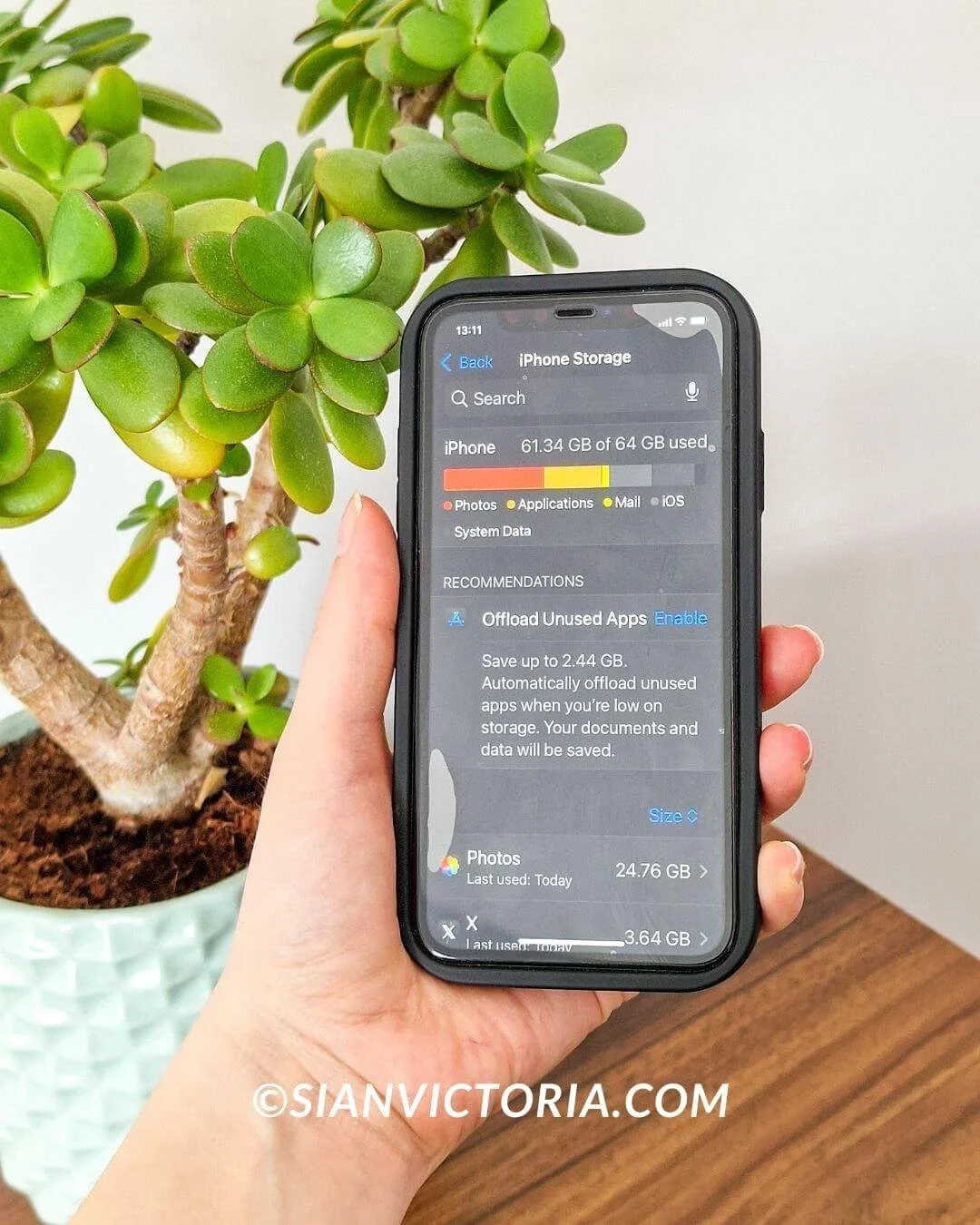
Let’s not overlook the storage situation. If you’re constantly battling low storage notifications, it’s no wonder your phone’s performance is suffering. A cramped storage space can lead to a sluggish device, making everyday tasks a hassle. So, if you find yourself running out of space often, it may be worth assessing the overall health of your device.
2. Outdated Operating System
Your mobile device's out-of-date operating system can slow things down and put your security at risk. When developers roll out new updates, they usually come packed with excellent features, better performance, and essential security fixes. If your phone is stuck on an older version, you might miss out on these upgrades, leaving your device open to malware and other dangers.
Many new apps and services are designed to work best with the latest operating systems. Installing or running new apps could become a headache, leading to crashes and a frustrating experience. You might even notice that your battery doesn’t last as long, as older systems aren’t optimised for battery life like their newer counterparts.
There’s also the chance that your device manufacturer could stop providing support altogether, meaning you won’t receive any more updates. Maintaining an up-to-date operating system is essential to staying safe and maximising your mobile. If your device can’t handle the latest OS, that’s a significant sign that it might be time for an upgrade. Regularly updating ensures you're protected and enjoy all the latest features your mobile offers.
3. Poor Battery Life
Dealing with a mobile phone that can't keep its charge can be incredibly frustrating. If you reach for the charger more than once daily, something must be fixed. Today's smartphones are built to last all day with regular use, so if you're constantly recharging, it might be a sign that your battery is on its last legs.
You may notice your battery percentage dropping rapidly, even when the phone is resting in your pocket, or it might take longer than usual to get back to full power. These can all be red flags pointing to a weakening battery. Another significant issue is if your phone unexpectedly shuts off even when the battery seems to have enough juice left. If that's happened to you, a replacement battery or a new phone might be in order.
Some users also report noticing their battery swelling, a serious concern that shouldn’t be ignored. If you see any unusual bulging or changes in the phone's shape, it's crucial to act quickly. Due to this, there have been many cases of phones catching fire and exploding when charging.
To monitor your battery's condition, regularly checking your device's settings can give you a clearer picture of its performance and lifespan. If it’s time to upgrade, consider investing in a newer model with a more efficient battery. This can significantly enhance your mobile experience, enabling you to maintain connectivity without being concerned about power outages.
4. Insufficient Storage
Running low on storage on your phone can be a real headache, especially when you want to capture special moments or download new apps. When your device starts to fill up, it not only gets more challenging to save your photos, videos, and music but also drags down the overall performance of your phone. A nearly complete storage can lead to frustrating slowdowns, making even simple tasks sluggish. You might find yourself waiting longer when switching apps or facing issues when installing updates.
One of the most significant signs that you're running out of space is the constant notifications reminding you to clear some room. As you use your phone, apps and media can pile up surprisingly fast. Big apps, high-resolution pictures, and 4K videos can gobble up storage quickly. Cleaning out unused apps and old media can help for a bit, but it’s usually just a quick fix.
Cloud storage can be an intelligent way to offload some of your files, but if you're constantly struggling to manage your storage, it may be time to reconsider your current device. A phone with more storage could save you the hassle and give you a smoother experience for a long time. I always recommend regularly backing up your media; external hard drives are an essential item in my digital survival kit, in addition to cloud storage.
5. Lack of Support for New Apps
Have you been having trouble installing or using newer apps on your phone? It could indicate that your device is getting old or your operating system needs an update. Developers typically create their applications with the latest smartphones in mind, which means they’re packed with advanced features that demand more processing power.
If you're using an older model, you might need help to keep up. You might notice that some apps aren’t even available for your device, or when you download them, they may crash unexpectedly or refuse to open. This can be unpleasant, particularly if you want to check out the latest features or need certain apps for work or personal tasks.
To make matters worse, app developers often stop updating older versions, which means you miss out on crucial features and security fixes. If you usually find yourself stuck in this situation, it could be a sign that your phone isn’t up to par.
If there is no way around it, consider an upgrade. A new device will enhance your overall experience and give you access to the latest apps and innovations, keeping you connected to the best of modern technology.
6. Physical Damage
Physical damage to your mobile is often a clear sign that it might be time for a repair or even a new device. Cracked screens are ubiquitous and usually happen after an accidental drop. Not only do they make your phone look rough, but they can also affect how responsive the touchscreen is, making it frustrating to read messages or scroll through photos.
Then there’s water damage, damaging your phone’s internal workings. Even a tiny droplet can lead to short circuits, strange behaviour, or total failure of your device. If your buttons are sticking or not working like they used to, it can hamper your experience and hinder the phone’s functionality.
While dents and scratches on the exterior might seem like cosmetic issues, they can sometimes hint at deeper problems within the device. A phone that has experienced severe physical trauma might also struggle with sound quality, camera functionality, or even connectivity issues.
If you notice any of these problems, consider the cost of repairs against the price of a new phone. Places like Likewize Repair and many others on the high street can advise you if you are unsure of what's best to do; however, always seek a second opinion to ensure you don’t spend unnecessary money. Physical damage affects not only the performance but also the safety of your device. Making a wise decision now can help you avoid many headaches!
7. Camera Quality Deterioration
A mobile phone with a great camera is crucial for snapping those unforgettable moments, whether a fun vacation shot or a spontaneous selfie. If you’ve noticed that your photos are blurry, lacking detail, or don’t have the vibrant colours they used to, it might be a sign that your camera is declining. Sometimes, this can happen because the lens has gotten scratched or the camera module isn’t functioning as it should, affecting picture quality.
Don’t forget about outdated software—if it’s obsolete, you may miss out on new features designed to enhance your photography. Low-light performance is another tricky area; if your shots in dim settings are starting to look grainy, that’s a red flag. If your mobile’s camera isn’t delivering the sharp, lively images you once loved, and updates aren’t making a difference, it might be time to consider getting a new device.
The newest smartphones come packed with cutting-edge camera technology, like multiple lenses and innovative AI enhancements, which can take your photos and videos to a new level. If you love taking pictures like me, investing in a new phone with a superior camera can reignite your passion for photography, ensuring that every memorable moment is captured beautifully.
8. Connectivity Problems
Connectivity issues can be annoying, especially since staying connected is essential today. If you often find your phone dropping calls, struggling to maintain a steady Wi-Fi connection, or having difficulty pairing with Bluetooth devices, that’s a definite red flag. Often, the problem lies with outdated hardware or software, which might be holding your phone back from meeting today’s connectivity standards.
Poor signal strength can result from damaged internal antennas or interference from other electronics around you. If your phone takes ages to connect to 4G or 5G networks, it might be a sign that it’s time to consider an upgrade. Losing a GPS signal frequently can also make navigation iffy, complicating your travels even more.
Ensuring your device can handle the latest connectivity features can boost your experience, giving you faster internet speeds and more apparent call quality. If simple fixes like resetting your network settings or updating your software aren’t helping, it might be worthwhile to consider getting a new phone. A fresh device could provide a reliable connection to stay in touch and surf the web without interruptions.
9. Software Incompatibility
Dealing with software incompatibility can be incredibly frustrating and can hold back your mobile's performance. It’s annoying when apps won’t install or crash because they don’t mesh well with your device’s hardware or operating system. This issue often arises as developers focus on the latest models, leaving older ones in the dust.
For example, many advanced apps now demand specific hardware capabilities or recent OS features that older devices can’t handle. This limits access to new features and entertainment and impacts productivity, mainly if you rely on certain apps for work or personal projects.
Frequent error messages or failed updates can disrupt the smooth experience you expect from your phone. If you often need help with this kind of trouble, consider upgrading your device. A newer model can provide better compatibility, letting you access a wider variety of features without the hassle. Embracing these technological advancements means you won’t miss out on the full capabilities that modern apps offer.
10. Trade-in and Upgrade Programmes
If you're considering upgrading your mobile without draining your wallet, trade-in and upgrade programs are a fantastic option. Many carriers and phone manufacturers have these initiatives where you can swap your old device for credit toward a new one. Not only does this help you save cash, but it also ensures your old phone gets recycled responsibly.
To see if your device qualifies for a trade-in, visit the retailer's website or drop by a store. They’ll examine your phone's condition, checking for screen damage, battery performance, and overall performance. The better shape your phone is in, the more you can get for it. You might also catch special promotions offering even more trade-in value, making now a great time to upgrade.
Many plans also let you break down the cost of your new phone into manageable monthly payments, which can help ease the financial strain. Participating in a trade-in program keeps you updated with the most incredible technology and features and ensures you have a device that fits your lifestyle. If you're eyeing that shiny new phone, taking some time to research trade-in options can lead to an affordable and eco-friendly way to enjoy the latest mobile tech.
How to Transition to a New Mobile
Back Up Your Data: Before anything else, ensure all your important files—photos, contacts, apps, and documents—are safely backed up. Consider using reliable cloud services like Google Drive or iCloud to ensure you're covered if anything goes wrong.
Transfer Data to Your New Phone: It's time to transfer everything to your new device after backing up. Most phone manufacturers have user-friendly guides or apps to help you do this without a hitch.
Log Out of Accounts: To keep your personal information safe, sign out of all your accounts on your old phone. Remember to disconnect the two-factor authentication from the old device if you have it set up.
Update Your Contacts: If you’ve changed your phone number, let your friends, family, and colleagues know. Double-check that your contacts have been transferred correctly and are up to date.
Get Your New Phone Set Up: Follow the prompts on your new phone to set it up. This usually includes connecting to Wi-Fi, signing into your accounts, and restoring from your backup.
Personalise Your Settings: Take a moment to customise your new device. Change the wallpaper, set your favourite ringtones, and adjust your notification settings so they feel just right.
Download Essential Apps: Don’t forget to install the apps you use most frequently. Browse the app store to discover new or updated applications that could improve your mobile experience.
Test Everything Out: Once you’ve settled into your new phone, give it a thorough check. Make sure calls, texts, the internet, and all the apps work smoothly. Testing features like the camera and battery life is also a good idea.
Consider Selling or Recycling Your Old Phone: If you're not trading in your old phone, consider selling your unwanted item or responsibly recycling it. Eco-friendly services are available to help you dispose of electronic waste properly.
Secure Your Device: Take the security steps on your new phone. Set up measures like fingerprint or facial recognition to keep your data safe. Make it a habit to update your operating system and apps regularly to stay protected.
These actions will guarantee a seamless transition to your new mobile device while keeping your data safe and sound.
To conclude
Deciding whether to upgrade or fix your phone can feel time-consuming and like letting go of a trusty friend, but spotting the right signs can make the process smoother. If you’re dealing with a battery that drains quickly, a device that lags, or noticeable physical damage, it might be time to think about a change. Staying updated with the newest tech isn’t just about having the latest model; it brings better performance, enhanced security, and an overall more enjoyable experience.
If budget is a concern, check out trade-in programs—they can help make getting that new phone more affordable and eco-friendly. By being proactive about your decision, you’ll save yourself much hassle and ensure your mobile experience is ideally suited to what you need.
*SHOP THE POST
If you're noticing signs that your mobile might need an upgrade or repair, consider investing in these essential products to enhance your experience. First, a sleek and robust phone case can protect your device from further damage. Pair it with a screen protector to keep your display pristine and responsive. If battery life becomes a concern, a portable power bank is a lifesaver, ensuring you're always connected. For those experiencing charging issues, a fast-charging cable can significantly reduce downtime. Finally, if your storage space is limited, a reliable microSD card can provide the extra capacity you need for apps, photos, and more. Alternatively, get an external hard drive if you’d prefer to back up. Explore these options to give your mobile a new lease of life.